

Features
FoQus is deliberately small. Each feature is optional, starts from a sensible suggestion and can be changed before every pause.
Breathing guides
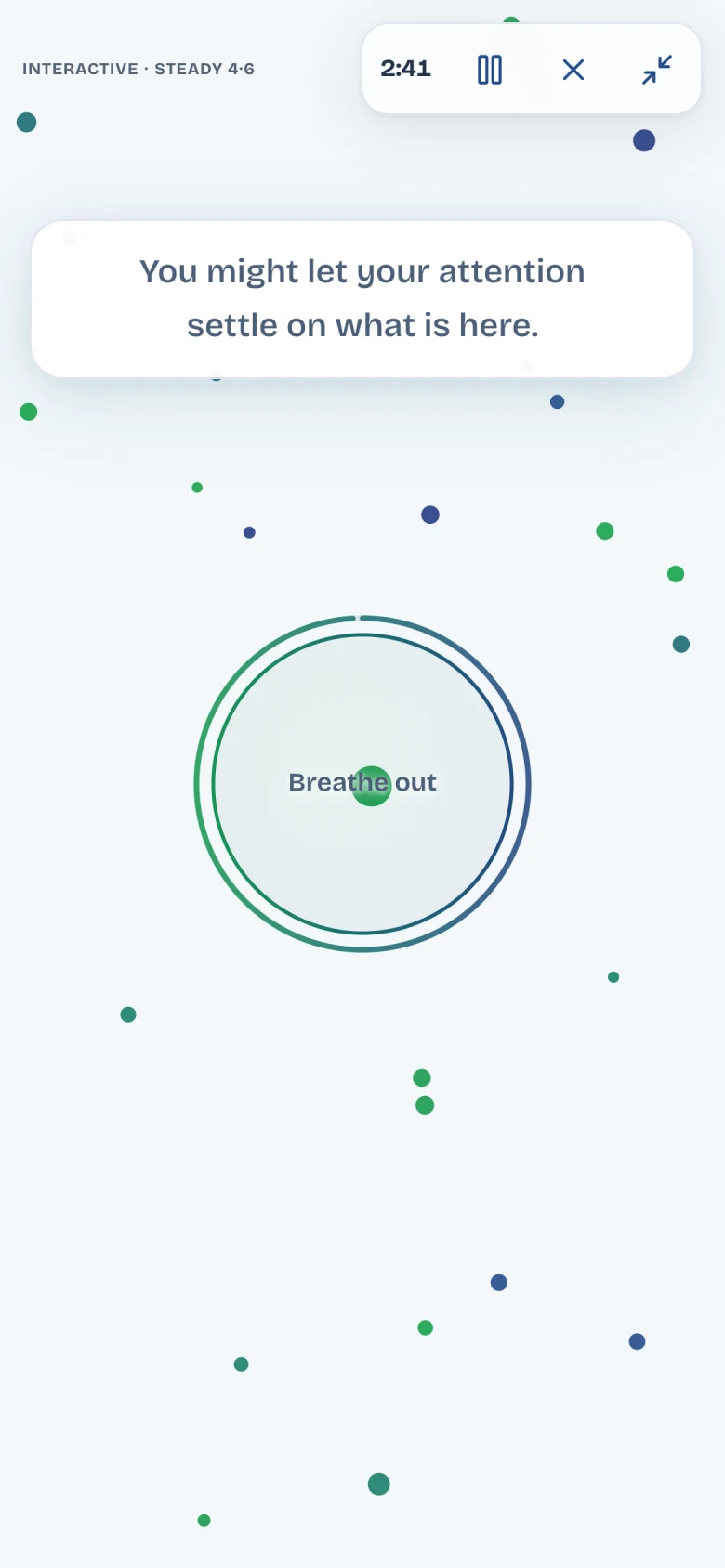
The centre circle grows as you breathe in and shrinks as you breathe out. Choose the pace, or no pace at all.
Steady 4·6 is suggested: four seconds in, six seconds out. Even 5·5 uses equal halves. Natural keeps the circle still so you can breathe your own way.
The circle is a visual cue. FoQus does not measure your breathing.
Breathe at your own pace and stop at any time. If you feel dizzy or unwell, return to normal breathing. If you are pregnant or have a heart, lung or seizure condition, check with a clinician before following a breathing guide.
Natural
No pacing. Breathe your own way.
Steady 4·6
4 seconds in, 6 seconds out. Suggested.
Even 5·5
5 seconds in, 5 seconds out.
Ten seconds, no sound. Starts only when you press the button.
Sounds
15 background sounds, from rain and shore to soft tones, plus Silent. In the app, each one is generated live during your session. The previews below are 30-second recordings.
Nature
Soft rain
A smooth rain wash with occasional droplets.
Sea swell
A quiet, slowly rising and falling wash.
Gentle wind
A low, soft wash of filtered air.
Night drift
A low night-air bed with warm notes.
Forest stream
A softly burbling stream with occasional bubbles.
Gentle fire
Warm firelight with occasional muted crackles.
Night crickets
Distant cricket chirps over faint night air.
Distant rain and thunder
Soft rain with rare, far-away low rumbles.
Ocean shore
Slow shore waves with a gentle pebble fizz.
Tones
Warm pad
A slowly shifting, low musical chord.
Low hum
A soft, steady blend of low notes.
Light pulse
Two soft notes with a slow shimmer.
Singing bowls
Slow, softly overlapping resonant bowl tones.
Wind chimes
Sparse pentatonic chimes over a light breeze.
Ambient keys
Spacious, soft piano-like notes with a light tail.
These are 30-second recordings of sounds the FoQus app generates live during a session.
Interaction sounds
A separate, quieter sound can play when a light reaches the circle: soft click, glass tap, gentle bell, warm chime, soft pluck or low pulse. The gentle bell is suggested, and you can switch it off.
Volume and previews
In setup, every sound has a preview button, and background and interaction sounds have separate volume controls. FoQus never uses your microphone and plays nothing until you start a preview or a session.
Gentle statements
Short lines that can appear on screen during a pause. They are written to be noticed, not answered.
After a quiet start, a line appears now and then, stays for a few seconds and fades away. A closing line appears shortly before the end.
Statements are on in the suggested setup. Switch them off in setup if you prefer a quiet screen.
- You might let your attention settle on what is here.
- A thought can come and go without needing an answer.
- This pause does not need to fix anything.
Modes and length
Interactive
Guide the lights. Suggested.
Move your pointer or finger near a light to nudge it towards the centre circle. You can also guide lights with the keyboard.
Ambient
Simply watch.
The lights drift and gather on their own, so you can leave your hands still and just watch.
Length
1, 3 or 5 minutes.
Three minutes is suggested. You can pause, or end early and still see how long you stayed.
Full screen
On in the suggested setup.
The session opens full screen when it starts. Press F to switch, or Esc to leave it.
Reflection and reminders
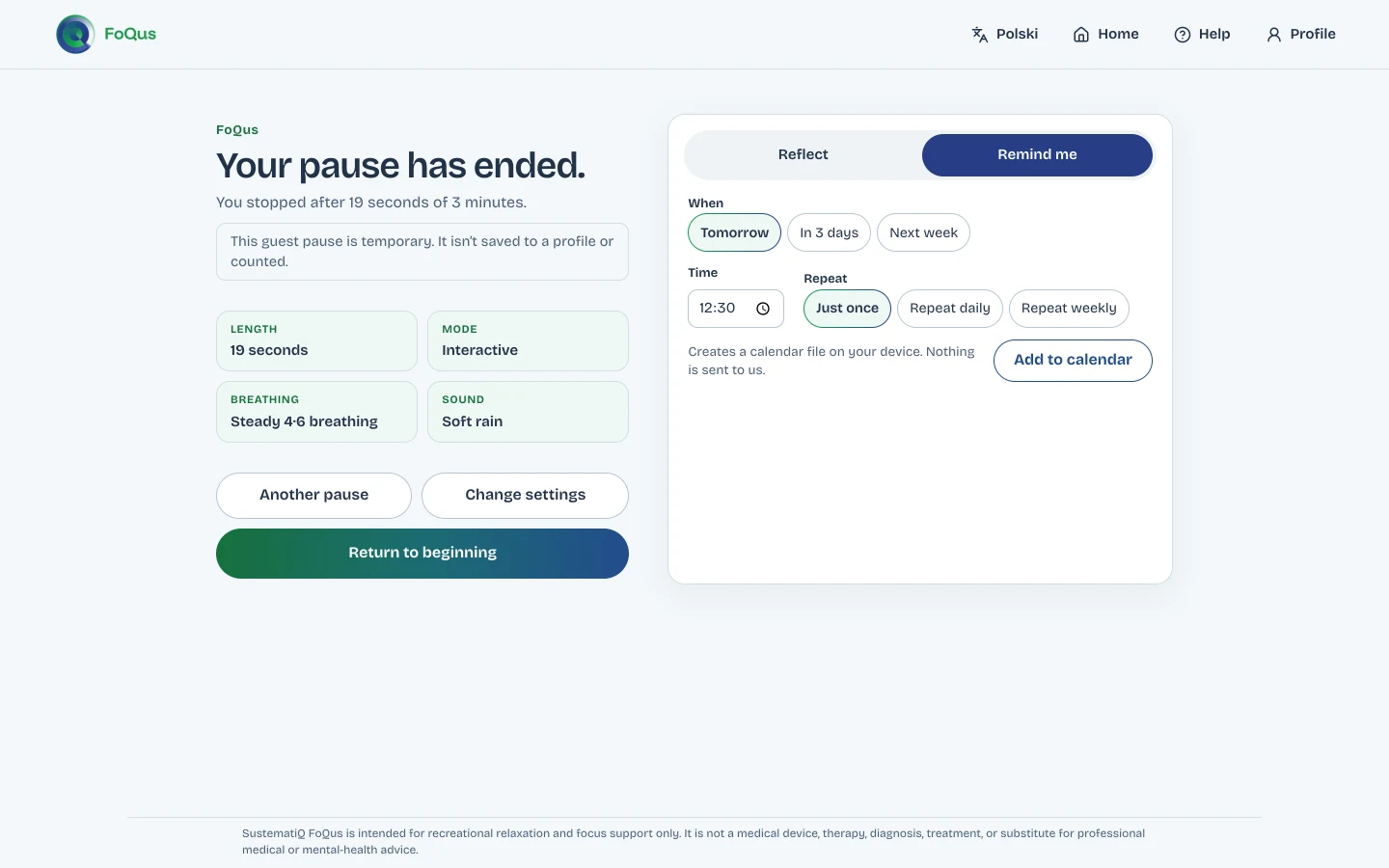
When a pause ends, two optional tabs sit beside the summary.
Reflect
Choose how you feel now (calmer, clearer, about the same, more distracted, or prefer not to say) and add a note if you like. Skip it whenever you want.
Remind me
Pick tomorrow, in three days or next week, set a time and choose whether it repeats. FoQus creates a calendar file on your device for your own calendar app.
Guest or profile
Both work without an online account. The difference is what is kept after you close the page.
| Guest | Local profile | |
|---|---|---|
| What you need | Nothing | A nickname |
| After you close the page | Nothing is kept | Your choices, minutes, history and reflections stay in this browser |
| Next visit | Starts from the suggested setup | Offers your last choices |
| Removing it | Close the page | Reset FoQus data in settings, or clear the site’s data in your browser |
A local profile is stored in this browser only. It is not encrypted or synced, so anyone using the same browser could see it. More about privacy
Accessibility
- Every control can be reached with Tab and used with Enter or Space.
- Keyboard guidance lets you select and guide lights without a pointer.
- Reduced motion follows your device setting, and you can change it in setup.
- The pause works on a phone or tablet as well as a computer.
We are working towards WCAG 2.2 AA and have not yet completed a full audit. Accessibility statement
FoQus is in closed alpha.
Request a place through SustematiQ. Every request is reviewed by a person, and places are limited.